

- Dockerfile using uv
- Dockerfile using pip
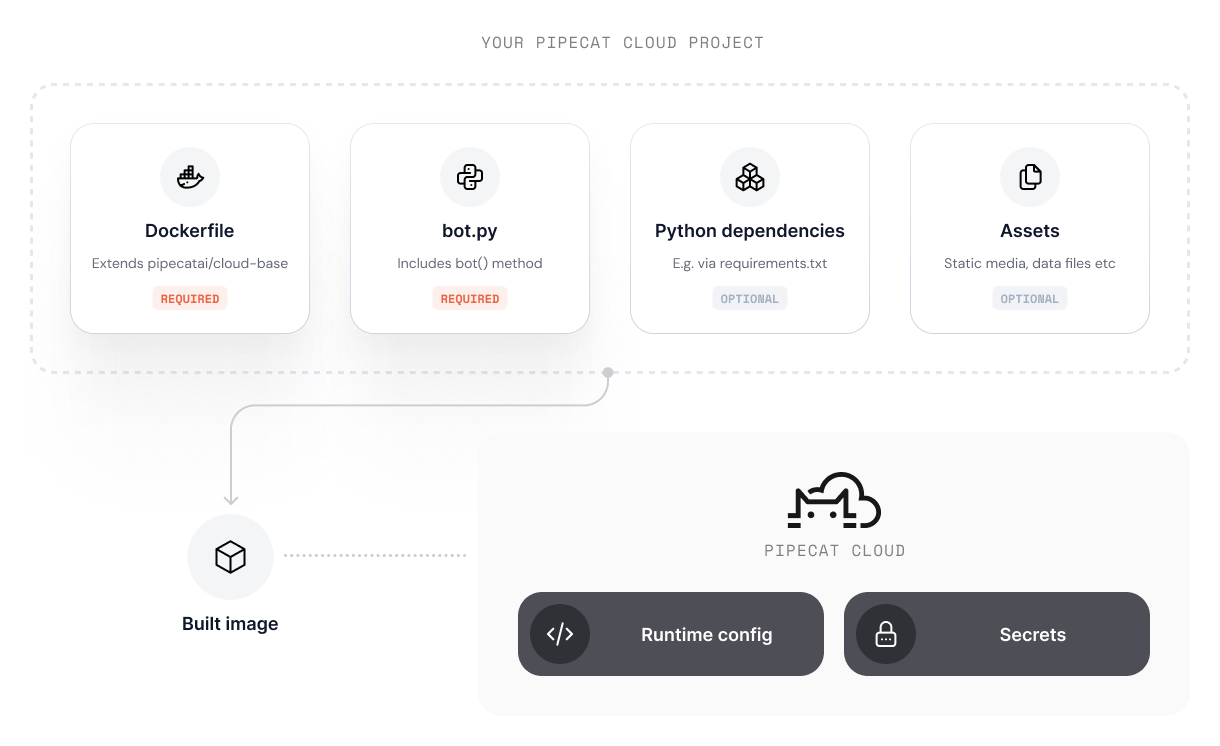
Using an official base image
Pipecat Cloud provides a series of base images that we recommend for most use-cases. Base images provide:- Simplified development and deployment
- Optimizations for performance and security
- Pre-installed system dependencies for most multi-modal agent use-cases
- Your project must contain a
bot.pyfile that defines the agent pipeline - The
bot.pymust contain abot()method that is the entry point for your agent pipeline - The
bot()method must be asynchronous, e.g.async def bot():
CMD as part of your Dockerfile - the base image is configured to run your bot.py module.
You can browse available base images in the Pipecat Cloud Docker Hub .
Reserved paths
The base image uses the/app directory for its internal operation. Avoid copying files to /app in your Dockerfile to prevent conflicts with system files.
Reserved HTTP routes
The base image exposes the following HTTP routes for Pipecat Cloud platform integration:These routes are automatically configured based on available features. For
example, the
/whatsapp route is only available when WhatsApp environment
variables are configured.Reserved environment variables
The base image uses the following environment variables for configuration:
For WhatsApp integration, the following environment variables are required:
Logging available features
To see which features are available in the base image at startup, setPCC_LOG_FEATURES_SUMMARY=true. This outputs a summary like:
Available base images
The base image supports multiple Python versions. The default Python version is 3.12.
Latest tags:
dailyco/pipecat-base:latest(Python 3.12, default)dailyco/pipecat-base:latest-py3.10(Python 3.10, deprecated)dailyco/pipecat-base:latest-py3.11(Python 3.11)dailyco/pipecat-base:latest-py3.12(Python 3.12)dailyco/pipecat-base:latest-py3.13(Python 3.13)dailyco/pipecat-base:latest-py3.14(Python 3.14)
dailyco/pipecat-base:0.1.0(Python 3.12, default)dailyco/pipecat-base:0.1.0-py3.10(Python 3.10, deprecated)dailyco/pipecat-base:0.1.0-py3.11(Python 3.11)dailyco/pipecat-base:0.1.0-py3.12(Python 3.12)dailyco/pipecat-base:0.1.0-py3.13(Python 3.13)dailyco/pipecat-base:0.1.0-py3.14(Python 3.14)
Using a custom image
For more complex use-cases, you can use a custom image. When doing so, we recommend following best practices to ensure your agent instance runs optimally on the platform. Our base image is open source and serves as a useful blueprint for configuring your custom agent image.Agent image structure
Pipecat Cloud agent images must adhere to a specific structure to run on the platform. Our base images abstract away much of this complexity, but if you are building a custom image, you must ensure your agent adheres to the following:- HTTP API that can handle requests from the platform to configure and run agent instances.
- The necessary system level dependencies (such as Python.)
POST /bot route that will be called by the platform.
We recommend using FastAPI to create this route. Please refer to the base image code for an example of how to do this.
Building the image
If you’re using cloud builds, you only
need a Dockerfile in your project — the CLI builds and deploys your image
automatically. The section below applies if you’re building and pushing images
to your own container registry.
- All dependencies required for your agent to run.
- Assets (such as images or models) available in the container filesystem
- The entry point for your agent (usually a Python script)
- Additional system dependencies (if required)
Best practices
- Keep your image as small as possible. Use multi-stage builds to reduce the size of the final image.
- Use a
.dockerignorefile to exclude unnecessary files from the image. - Pipecat Cloud will automatically restart your agent if it crashes. Ensure your agent can handle this gracefully.
- Use Secrets to securely store sensitive information in your agent image.
- To optimize for fast start-ups, avoid long running or blocking processes during initialization.